The Administrator or an employee who has been given Manage Course/Batch privileges can delete a Course/Class when it is no longer required.
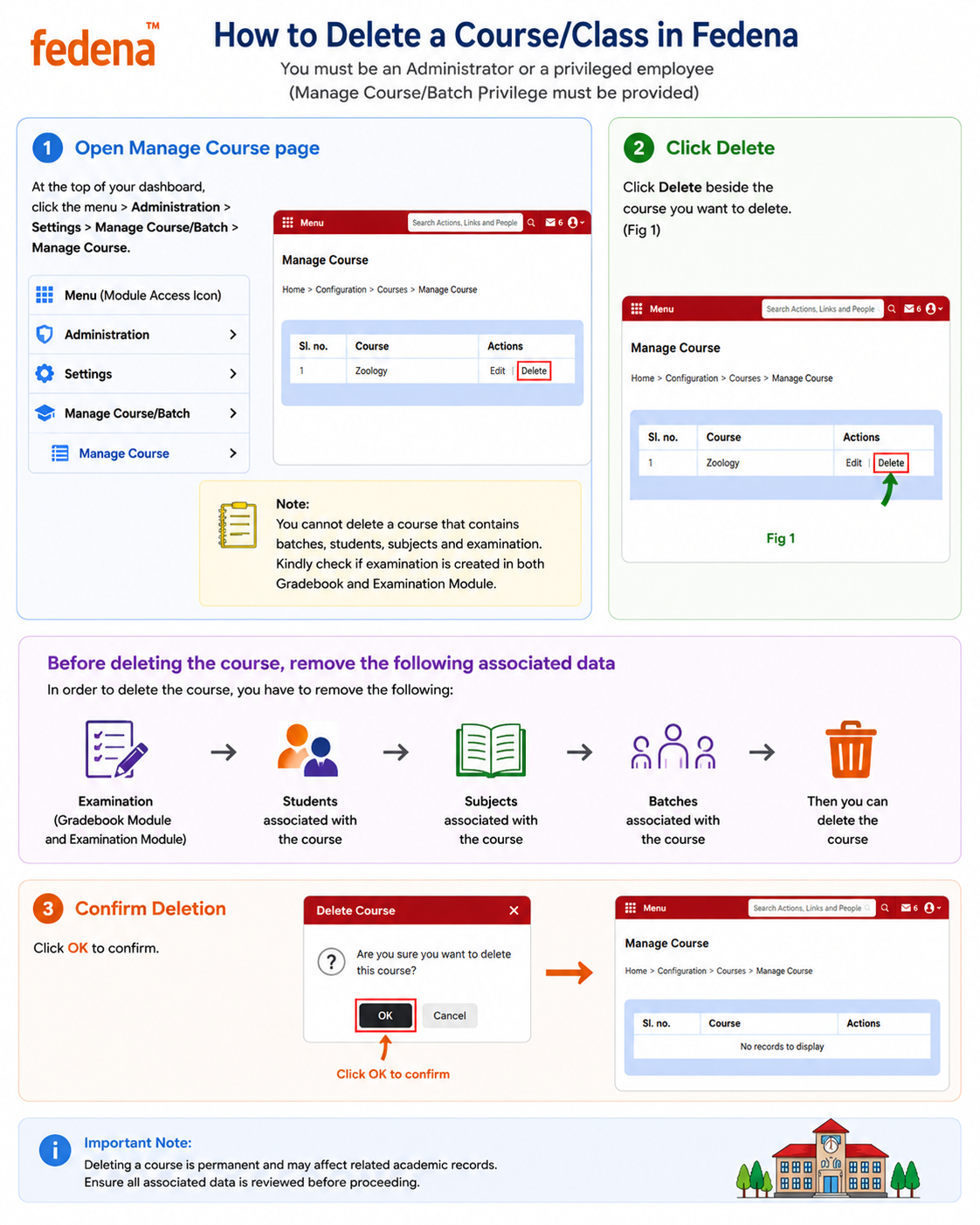
Step 1: Open Manage Course/Class
Navigate to:
Menu → Administration → Settings → Manage Course/Batch → Manage Course
This page displays all available Courses/Classes in the system.
Step 2: Select the Course/Class
Locate the Course/Class that you want to delete.
Click Delete beside the respective Course/Class.
Step 3: Confirm the deletion
The system will display a confirmation popup.
Click OK to confirm.
Deletion flow and things to be remembered
Remove Examinations
↓
Remove Students
↓
Remove Subjects
↓
Remove Batches
↓
Delete Course/Class
Note:
Deleting a Course/Class is permanent and may affect related academic records. Ensure all associated data is reviewed before proceeding.
Was this article helpful?
That’s Great!
Thank you for your feedback
Sorry! We couldn't be helpful
Thank you for your feedback
Feedback sent
We appreciate your effort and will try to fix the article