Note: Subject Amount is generally assigned when the Online Application Fee depends on the subjects selected by the student.
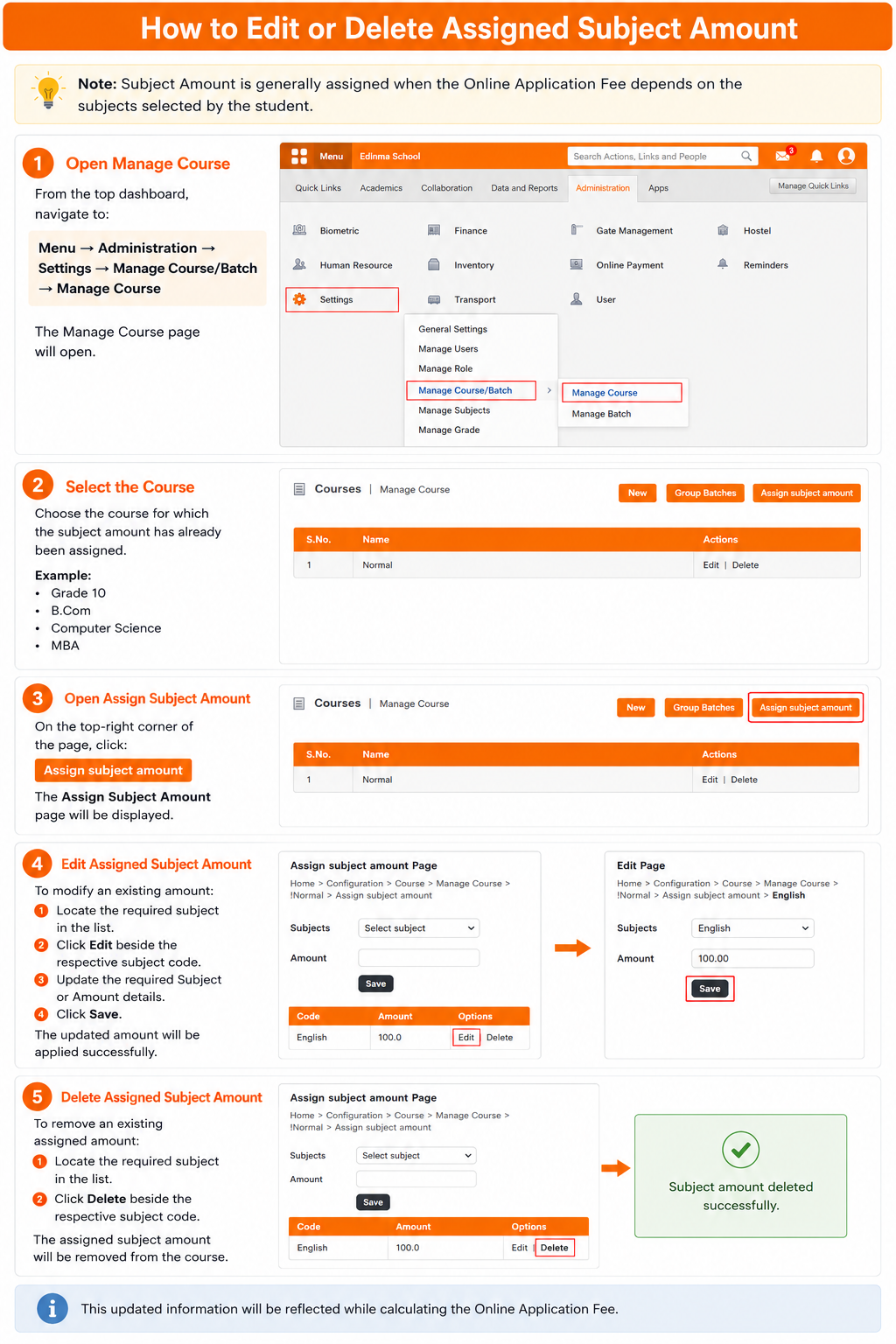
Step 1: Open Manage Course
From the top dashboard, navigate to:
Menu → Administration → Settings → Manage Course/Batch → Manage Course
The Manage Course page will open.
Step 2: Select the Course
Choose the course for which the subject amount has already been assigned.
Example:
- Grade 10
- B.Com
- Computer Science
- MBA
Step 3: Open Assign Subject Amount
On the top-right corner of the page, click:
Assign Subject Amount
The Assign Subject Amount page will be displayed.
Step 4: Edit Assigned Subject Amount
To modify an existing amount:
- Locate the required subject in the list.
- Click Edit beside the respective subject code.
- Update the required Subject or Amount details.
- Click Save.
The updated amount will be applied successfully.
Step 5: Delete Assigned Subject Amount
To remove an existing assigned amount:
- Locate the required subject in the list.
- Click Delete beside the respective subject code.
The assigned subject amount will be removed from the course.
This updated information will be reflected while calculating the Online Application Fee.
Was this article helpful?
That’s Great!
Thank you for your feedback
Sorry! We couldn't be helpful
Thank you for your feedback
Feedback sent
We appreciate your effort and will try to fix the article