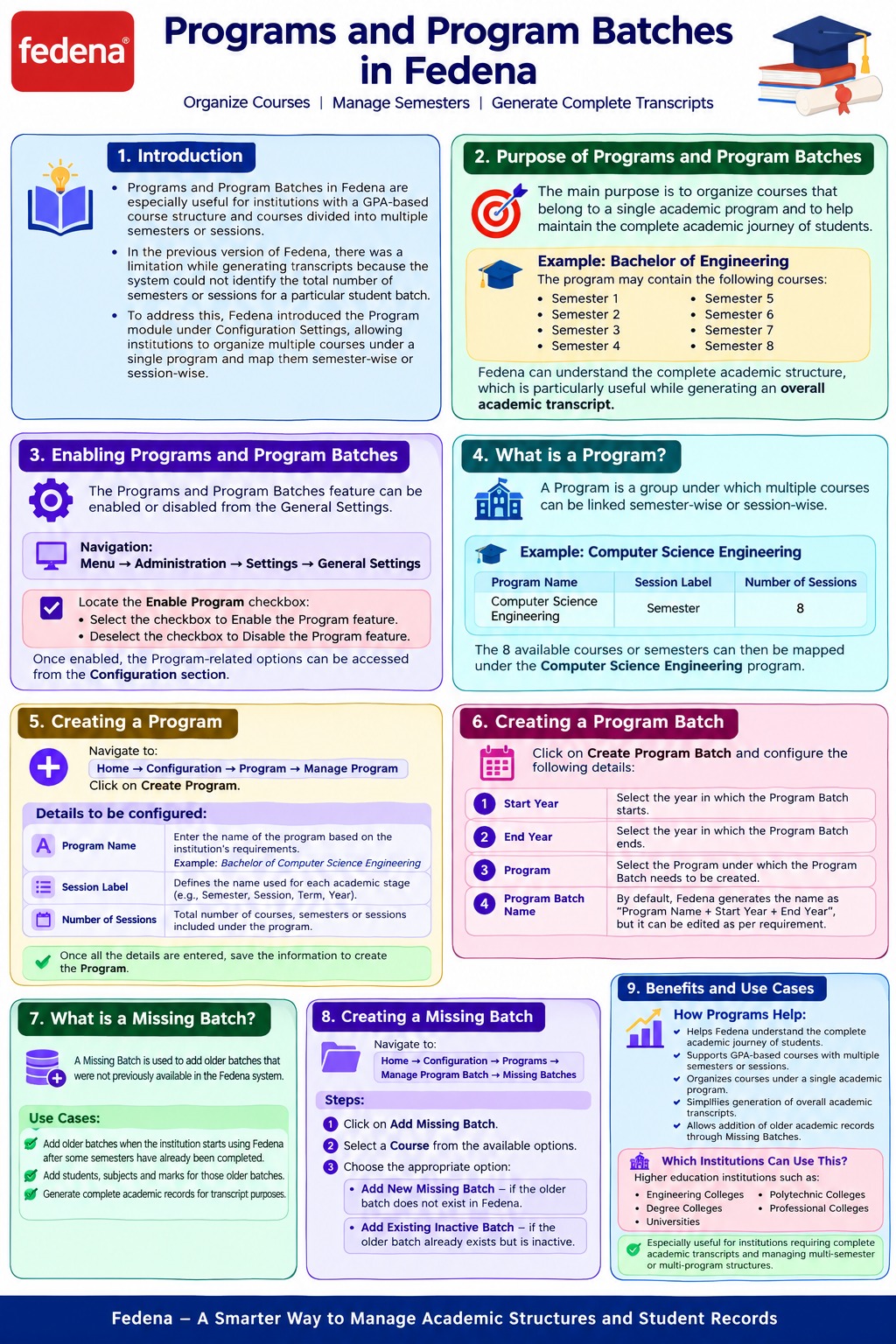
1. Introduction
The Programs and Program Batches feature in Fedena is especially useful for institutions that follow a GPA-based course structure and have courses divided into multiple semesters or sessions.
In the previous version of Fedena, there was a limitation while generating transcripts because the system could not identify the total number of semesters or sessions associated with a particular student batch.
To address this requirement, Fedena introduced the Program module under Configuration Settings. This allows institutions to organize multiple courses under a single program and map them semester-wise or session-wise.
2. Purpose of Programs and Program Batches
The main purpose of creating Programs and Program Batches is to organize courses that belong to a single academic program.
For example:
Program: Bachelor of Engineering
The program may contain the following courses:
- Semester 1
- Semester 2
- Semester 3
- Semester 4
- Semester 5
- Semester 6
- Semester 7
- Semester 8
By creating a Program and mapping all the semesters or sessions under it, Fedena can understand the complete academic structure of the student.
This is particularly useful while generating an overall academic transcript, as the system can identify all the semesters or sessions associated with a student.
3. Enabling Programs and Program Batches
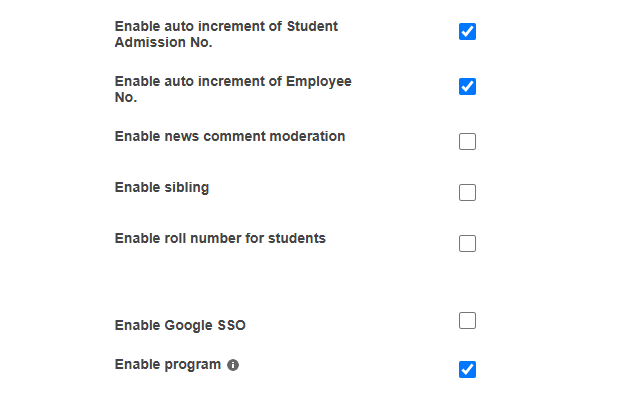
The Programs and Program Batches feature can be enabled or disabled from the General Settings.
Navigation
Menu → Administration → Settings → General Settings
Locate the Enable Program checkbox.
- Select the checkbox to Enable the Program feature.
- Deselect the checkbox to Disable the Program feature.
Once enabled, the Program-related options can be accessed from the Configuration section.
4. What is a Program?
A Program is a group under which multiple courses can be linked semester-wise or session-wise.
For example, a higher education institution may offer programs such as:
- Mechanical Engineering
- Computer Science Engineering
- Civil Engineering
- Bachelor of Commerce
- Master of Business Administration
Each program may contain multiple semesters or academic sessions.
Example
Program Name: Computer Science Engineering
Session Label: Semester
Number of Sessions: 8
The 8 available courses or semesters can then be mapped under the Computer Science Engineering program.
5. Creating a Program
To create a new program, navigate to:
Home → Configuration → Program → Manage Program
Click on Create Program.
The following details need to be configured.
Program Name
Enter the name of the program based on the institution's requirements.
Example: Bachelor of Computer Science Engineering
Session Label
The Session Label defines the name used for each academic stage within the program.
For example:
- Semester
- Session
- Term
- Year
If the program follows a semester system, the Session Label can be set as Semester.
Number of Sessions
This defines the total number of courses, semesters, or sessions included under the program.
For example:
If a degree program contains 8 semesters, the Number of Sessions can be entered as 8.
These sessions can then be mapped to the respective courses available in the Fedena instance.
Once all the required information is entered, save the details to create the Program.
6. Mapping Courses to a Program
After creating a Program, the sessions can be mapped to the available courses in the institution.
Example
Program: Bachelor of Engineering
| Session | Course |
|---|---|
| Semester 1 | BE Semester 1 |
| Semester 2 | BE Semester 2 |
| Semester 3 | BE Semester 3 |
| Semester 4 | BE Semester 4 |
| Semester 5 | BE Semester 5 |
| Semester 6 | BE Semester 6 |
| Semester 7 | BE Semester 7 |
| Semester 8 | BE Semester 8 |
This allows Fedena to identify the complete academic journey of students under the program.
7. What is a Program Batch?
A Program Batch is created when a particular Program is divided based on its academic duration or student intake period.
For example:
Program: Computer Science Engineering
Different groups of students may join the program in different years.
- Computer Science Engineering 2024–2028
- Computer Science Engineering 2025–2029
- Computer Science Engineering 2026–2030
Each of these can be created as a separate Program Batch.
This helps institutions manage different student intakes under the same academic program.
8. Creating a Program Batch
To create a Program Batch, click on Create Program Batch.
The following details need to be configured.
Step 1: Select Start Year
Select the year in which the Program Batch starts.
Step 2: Select End Year
Select the year in which the Program Batch ends.
Step 3: Select the Program
Select the Program under which the Program Batch needs to be created.
Step 4: Enter the Program Batch Name
By default, Fedena generates the Program Batch Name using:
Program Name + Start Year + End Year
However, the Program Batch Name can be modified according to the institution's requirements.
9. Example of Program and Program Batch
Program
Bachelor of Computer Science Engineering
Session Label: Semester
Number of Sessions: 8
Program Batch
Program Batch: Bachelor of Computer Science Engineering 2024–2028
Students admitted for the academic period from 2024 to 2028 can be associated with this Program Batch.
The individual semesters or courses can then be linked as required.
10. What is a Missing Batch?
A Missing Batch is used to add older batches that were not previously available in the Fedena system.
This feature is particularly useful when an institution starts using Fedena after students have already completed some semesters or courses.
Using Missing Batches, institutions can add:
- Older batches
- Students associated with those batches
- Subjects
- Marks
This information can then be considered while generating the student's complete academic record or transcript.
11. Why is Missing Batch Important?
Consider the following scenario:
A student completed:
- Semester 1
- Semester 2
- Semester 3
before the institution started using Fedena.
The student is currently studying in:
- Semester 4
If only Semester 4 is available in Fedena, the transcript will not contain the student's complete academic history.
Using the Missing Batch feature, the institution can add the older semesters and their related information.
This helps maintain the student's complete academic record for transcript generation.
12. Creating a Missing Batch
Navigate to:
Home → Configuration → Programs → Manage Program Batch → Missing Batches
Then follow the steps below.
Step 1: Click on Add Missing Batch
Click the Add Missing Batch button.
Step 2: Select a Course
Select the required course from the available options.
Step 3: Choose the Missing Batch Type
You will have two options:
Option 1: Add New Missing Batch
Select this option when the older batch does not already exist in Fedena.
A new missing batch can be created and the required student, subject, and mark details can be added.
Option 2: Add Existing Inactive Batch
Select this option when the older batch already exists in Fedena but is currently inactive.
The existing inactive batch can then be added as a Missing Batch.
Choose the appropriate option based on the institution's requirement.
13. How Programs Help in Transcript Generation
Programs and Program Batches help Fedena understand the complete structure of a student's academic journey.
For example:
Program: Bachelor of Commerce
Duration: 3 Years
Session Label: Semester
Total Sessions: 6
A student's academic record may contain:
- Semester 1
- Semester 2
- Semester 3
- Semester 4
- Semester 5
- Semester 6
By linking these courses under a Program, Fedena can identify the complete number of semesters associated with the student.
This is useful while generating an overall Transcript.
Was this article helpful?
That’s Great!
Thank you for your feedback
Sorry! We couldn't be helpful
Thank you for your feedback
Feedback sent
We appreciate your effort and will try to fix the article