There are three methods to sign in to the Fedena Connect App.
- Through credentials (Username & Password)
- Through OTP
- Through Email
- Sign in through Credentials
It is important to note that a user is created in the institute with all their details mentioned including their phone number and email address so that we can access the app using the other two methods.
The Admission No/Employee No. is the username and the password would be the username followed by 123 initially.
The users can change their password once they login to the accounts.
- Sign in through OTP
The user needs to enter their phone number and click on OTP and within a few seconds an OTP is generated and they can login to their account.
- Sign in through Email
This is similar to the OTP process, where the user needs to enter the email and an OTP is generated to their email id and they can then login using the OTP.
This process is feasible if the school hasn’t purchased the SMS gateway.
Steps:
- Sign in through email will be available under Sign in with OTP.
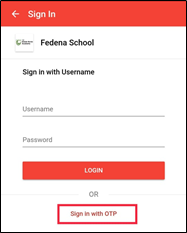
- Click on it to access the sign in
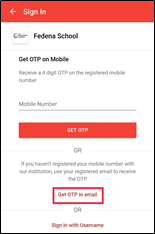
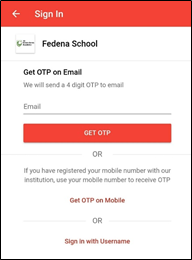
- Enter the email id and click on get OTP.
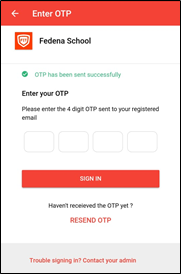
- Check your email to see if you have received the OTP, if you haven’t then you could request for it again by clicking on Resend OTP.
Was this article helpful?
That’s Great!
Thank you for your feedback
Sorry! We couldn't be helpful
Thank you for your feedback
Feedback sent
We appreciate your effort and will try to fix the article