Overview
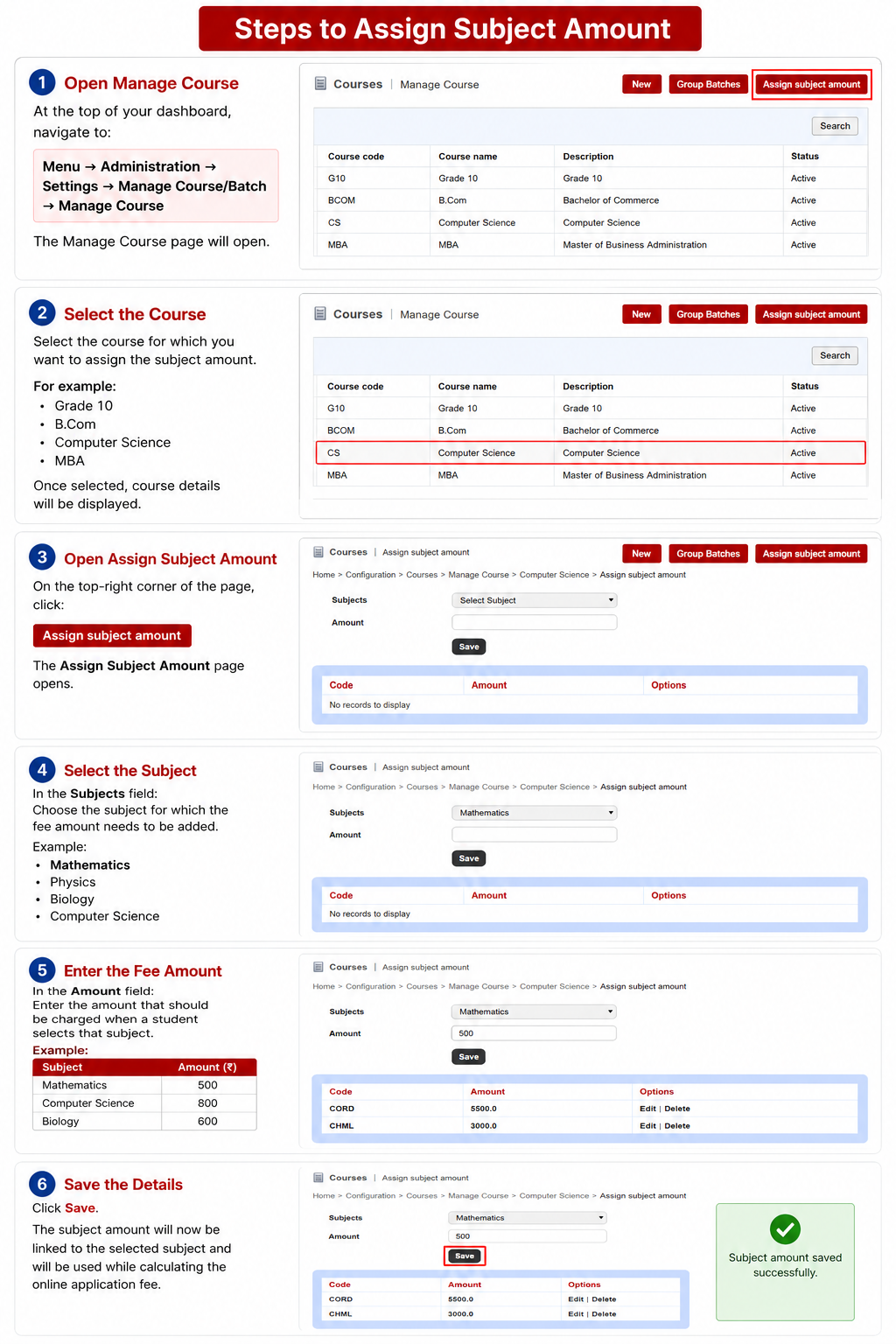
Subject Amount is used when the Online Application Fee varies based on the subjects selected by a student during admission.
For example:
- If a student selects Mathematics, the application fee may be ₹500
- If a student selects Computer Science, the application fee may be ₹800
In such cases, you need to assign a fee amount to each subject so that the system can automatically calculate the application fee based on the student's selected subjects.
The amount can be assigned to both:
- Normal Subjects
- Elective Subjects
Only the following users can perform this action:
- Administrator
- Privileged Employee with Manage Course/Batch permission enabled
Important Notes :
- Subject amount assignment is required only if the application fee depends on selected subjects.
- If the application fee is the same for all students regardless of subjects, this setup is not required.
- You can assign amounts for both normal and elective subjects.
- Ensure the subject is already created and mapped to the course before assigning the amount.
Was this article helpful?
That’s Great!
Thank you for your feedback
Sorry! We couldn't be helpful
Thank you for your feedback
Feedback sent
We appreciate your effort and will try to fix the article