Additional admission details
Fedena consists of pre-defined fields in the admission form for the Student admission which the user needs to fill while admitting the student inside the Fedena system.
Before admitting students, In order to meet the institution's policies and requirements the Admin/Privilege users can customize the Admission form.
Apart from the default fields available on the student admission form, Admin/Privilege users can add custom fields to record/store any additional details about the student.
Steps to add Additional Admission fields is as follows:
At the top of your dashboard, click the Menu
 > Administration > Settings > Add Admission Additional Details to open the Add additional details page.
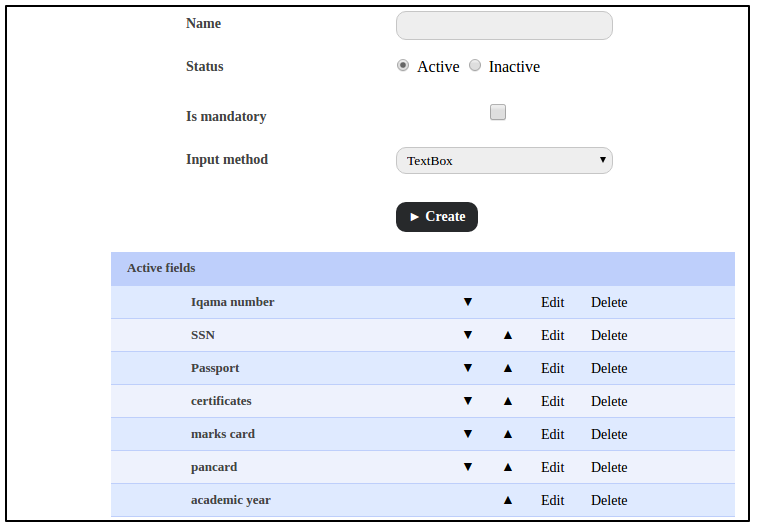
Fig 1.
In the Name field, enter the name of the custom field that will appear on the student admission form.
Select the status of the field as:
Active – A custom detail field with this status will be available in the student admission form and can be used to record additional details about the applicant.
Inactive – A custom detail field with this status will not be available in the student admission form.
Select the Is mandatory checkbox to set this field as a mandatory field that must be filled by while admitting students in Fedena.
In the Input method field, select the field input method from the following options:
Text Box – Enter brief text information.
Text Area – Enter detailed text information.
Select Box – Select an option from a drop-down list.
CheckBox – Select one or more items from a set of options.
Photo - To get the photo upload option.
Click the Create button.
Use the arrow icons
 to determine the order that the fields will appear in the student admission form.
Was this article helpful?
That’s Great!
Thank you for your feedback
Sorry! We couldn't be helpful
Thank you for your feedback
Feedback sent
We appreciate your effort and will try to fix the article