Student Category:
In an Institution, the student may be categorized in different categories.
The category may be on the basis of:
Boarding Category as Day Scholar, Week Boarding, Regular Boarding etc
Government Specified Category as Handicapped students, foreign, nationals, reserved category etc.
The institute may have different Fee structure, discounts etc which are based on such categories.
While admitting the student, the user will be asked to select under which category the student belongs to (For this in settings module, Student category needed to be added mainly for the Fees Creation).
To add the student category in the Fedena, follow below steps:
Steps:
Go to Menu > Administration > Settings.
Click on Manage Student Category.
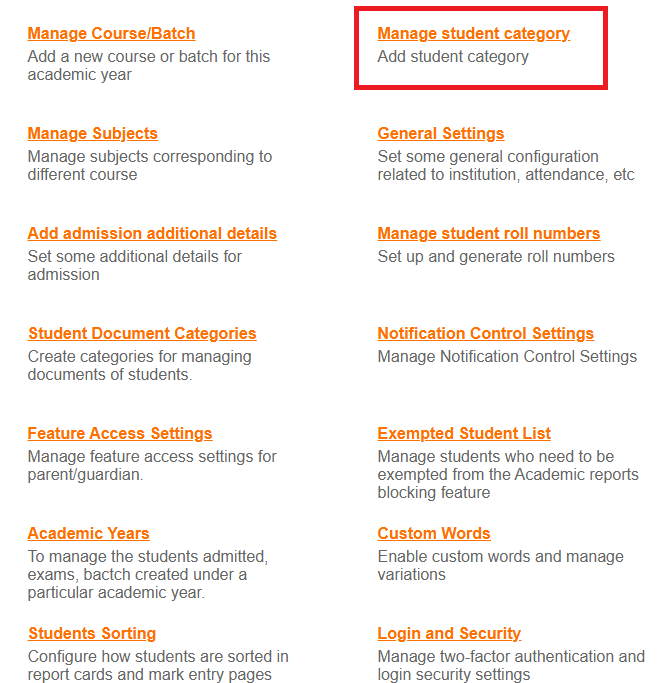
Fig 1.
Create a new student category by adding a name and save it.
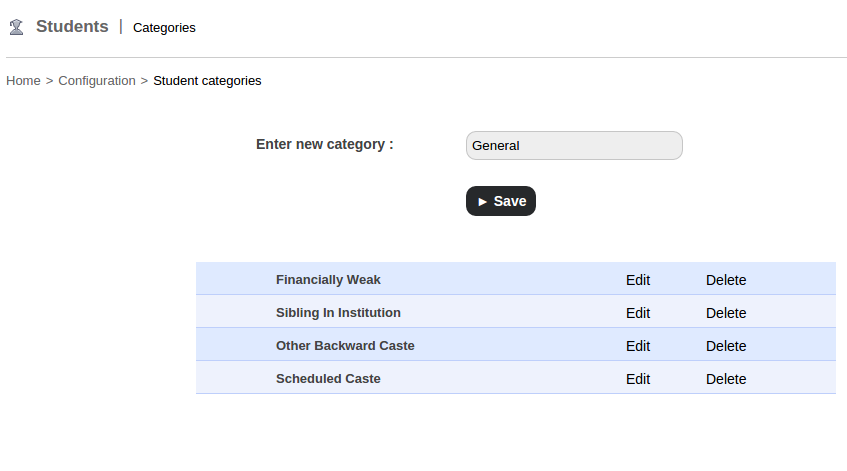
Fig2.
Student categories can be edited or deleted at any time.
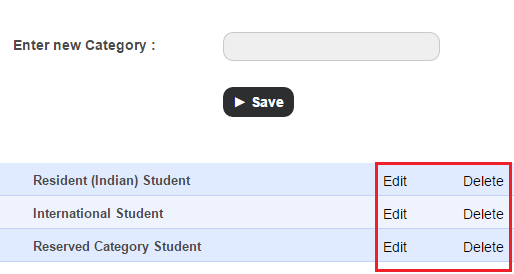
To edit the category, Click Edit beside the student category that you want to edit, make the necessary changes, and then click the Save button.
To delete the category, Click Delete beside the student category that you want to delete.
For more information, watch this-

Was this article helpful?
That’s Great!
Thank you for your feedback
Sorry! We couldn't be helpful
Thank you for your feedback
Feedback sent
We appreciate your effort and will try to fix the article