To configure and generate your institution's mobile app under the Fedena Group Mobile App, please share the following details and branding materials.
1. Name of the Mobile App (Institution Name)
Provide the institution's preferred name for the mobile app.
This name will be displayed to users within the app when they search for and select their institution.
Character Limit: The institution name should not exceed 30 characters.
2. HQ Cover Photo
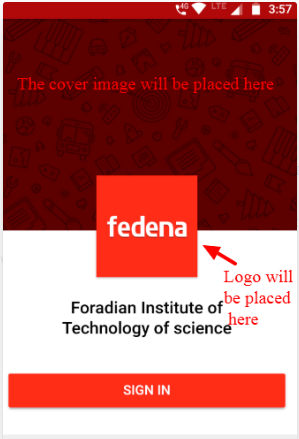
Provide a high-quality cover image of the institution.
This image will be displayed in the upper section of the mobile app and will enhance its overall appearance and branding.
The image will be cropped and resized as required to fit the supported layout.
Please refer to the sample screenshot for reference.
3. HQ School Logo
Provide a high-quality version of the institution's logo.
The logo will be used to represent the institution within the mobile app.
Please share a clear, high-resolution image. The required resizing and adjustments will be handled during configuration.
Please refer to the sample screenshot for reference.
4. Custom Pages and Content for the Mobile App
Please suggest 3 to 4 custom pages along with their respective content to be displayed in the mobile app.
Suggested pages include:
About Our School
Chairman's Vision
Principal's Message
School Vision and Mission
Please share the final content for each page in a clear and structured format.
5. Grievance Cell Contact Details
Please provide the following details of the institution's grievance cell. These details will be displayed in the mobile app so that users can contact the concerned department.
Contact Person's Name:
Email Address:
Contact Number:
Important Instructions :
Please share all the above information and branding materials together in a single consolidated email/reply to avoid delays in the app configuration process.
The information and branding details submitted will be used during app generation.
Once the app is generated, the submitted details cannot be modified. Therefore, we strongly recommend reviewing and verifying all information, images, and content before sharing the final details.
Please ensure that all images are of high quality and that the submitted content is final and approved by the institution.
Was this article helpful?
That’s Great!
Thank you for your feedback
Sorry! We couldn't be helpful
Thank you for your feedback
Feedback sent
We appreciate your effort and will try to fix the article