PIN numbers can be deactivated at any time. When deactivated, it cannot be used to register for a course online. PIN numbers also gets automatically deactivated after they have been used to register for a course.
Click the module access icon > Academics > Applicant Registration.
In the top right, click the Manage Pins button.
Click Show beside the PIN group. All PIN numbers are listed.

Click Deactivate beside the PIN number you want to deactivate.
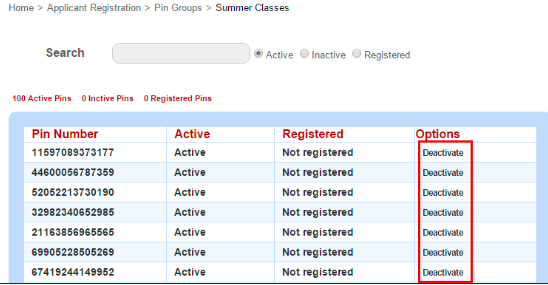
PIN numbers that you manually deactivate can be again made active again at any time.
If required, you can also deactivate the complete PIN group by clicking Deactivate.

Similar to individual PIN numbers, a PIN group can be made again active at any time.
Was this article helpful?
That’s Great!
Thank you for your feedback
Sorry! We couldn't be helpful
Thank you for your feedback
Feedback sent
We appreciate your effort and will try to fix the article